LinkedIn Learning Collection
What is LinkedIn Learning?
LinkedIn Learning is WCU’s online video training library with thousands of expert-created video tutorials covering a wide range of technical, business, software, and creative topics. LinkedIn Learning is designed for all levels of learners. Every employee has a free LinkedIn Learning account. Use your WCU credentials to access LinkedIn Learning, anytime, anywhere!
CLICK HERE FOR DIRECT LINK TO DOSA CORE COMPETENCY COLLECTIONS
What’s the difference between LinkedIn and LinkedIn Learning?
LinkedIn is a professional networking platform where individuals create profiles, connect with colleagues, recruiters, and industry peers, join groups, follow companies, post updates, and share content. It’s used for career development, job searching, building a personal brand, and staying informed about industry and business news. It offers:
- A profile listing your work history, education, skills, endorsements, etc.
- A network of connections and a feed of content relevant to your profession.
- Employer pages, job listings, and ways to highlight your accomplishments and presence in your field.
LinkedIn Learning is an online learning platform offering video-based courses across business, technology, creative, and professional skill areas. It provides subscriptions (individual or enterprise), giving access to a large library of courses you can take on demand. It offers:
- Course content authored by industry experts, often broken into “learning paths” (beginner → intermediate → expert) for structured growth.
- Personalized recommendations when linked with your LinkedIn profile - job title, industry, skills influence what courses are suggested.
- Certificates you can share or display (for instance, on your LinkedIn profile) after completion of courses.
Optimize Your Learning
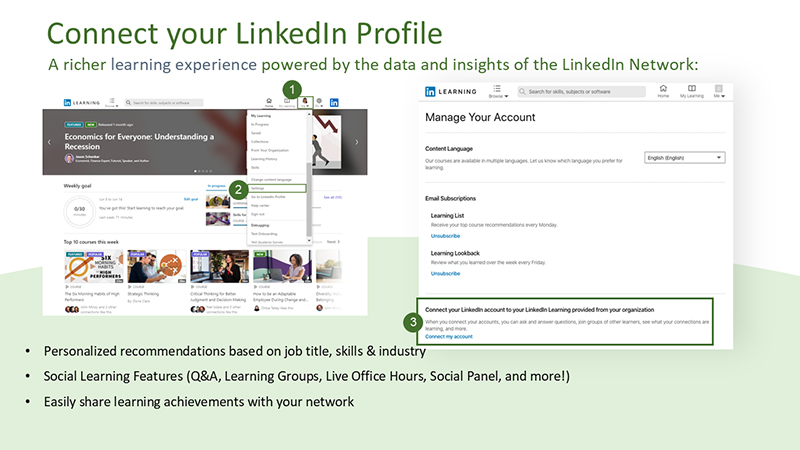
Connect your LinkedIn profile to your LinkedIn Learning account to enjoy a personalized learning experience powered by data and insights from the world’s largest professional network. Personalize your learning and receive recommendations based on your profile information, like your title, skills, industry, and past experiences. By linking your accounts, you’ll also be able to showcase your learning by sharing earned certifications. Access LinkedIn Learning and link your profile by following the steps in this image. Go to your settings and select Connect your LinkedIn account to your LinkedIn Learning provided by your organization.

If you have questions, reach out to Cara Jenkins cjenkins@wcupa.edu